2025 Guide: How to Choose the Best Watercooling Radiator for Your PC
When it comes to building a high-performance PC, one of the key components that can significantly influence cooling efficiency is the Watercooling Radiator. As PC enthusiasts aim to balance thermal management with aesthetic design, choosing the right radiator remains a critical decision. Renowned thermal management expert Dr. Emily Chen emphasizes, "The efficiency of your watercooling system heavily relies on the radiator’s ability to dissipate heat. It’s not just about picking any radiator; it's about selecting the one that perfectly suits your setup."
Understanding the intricacies of watercooling radiators can be daunting for those new to PC building. Factor in considerations such as radiator size, fin density, and material, and the task can quickly become overwhelming. However, arming yourself with the right knowledge can make this selection process far more manageable. In this guide, we will explore essential criteria that will aid you in making an informed decision about the best Watercooling Radiator for your PC setup in 2025. Whether you're a seasoned builder or a newcomer, our insights aim to simplify your journey toward optimal cooling performance.
Understanding the Basics of Watercooling Radiators in PC Builds
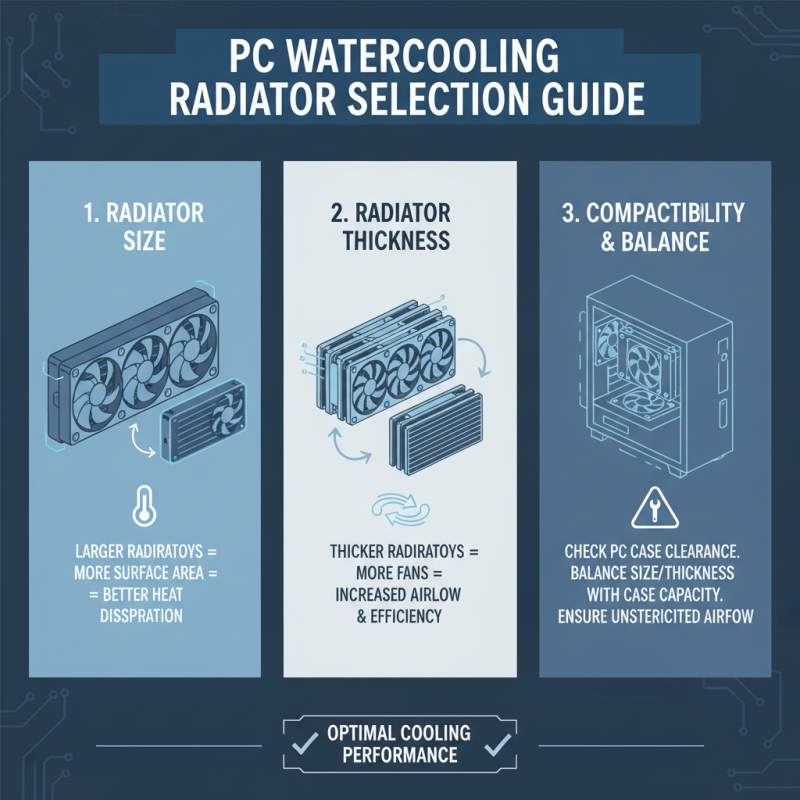
Understanding the basics of watercooling radiators is essential for anyone looking to build or upgrade a PC with effective cooling solutions. A watercooling radiator dissipates heat from the coolant that circulates through the system, providing better temperature management compared to traditional air cooling methods. The effectiveness of a radiator largely depends on its surface area, thickness, and the number of fans used. When choosing a radiator, consider the size—both the length and width—ensuring it fits within your case while providing adequate cooling.
Tip: When selecting a radiator, opt for one with a larger surface area for improved heat dissipation. This is particularly beneficial for high-performance CPUs and GPUs that generate more heat.
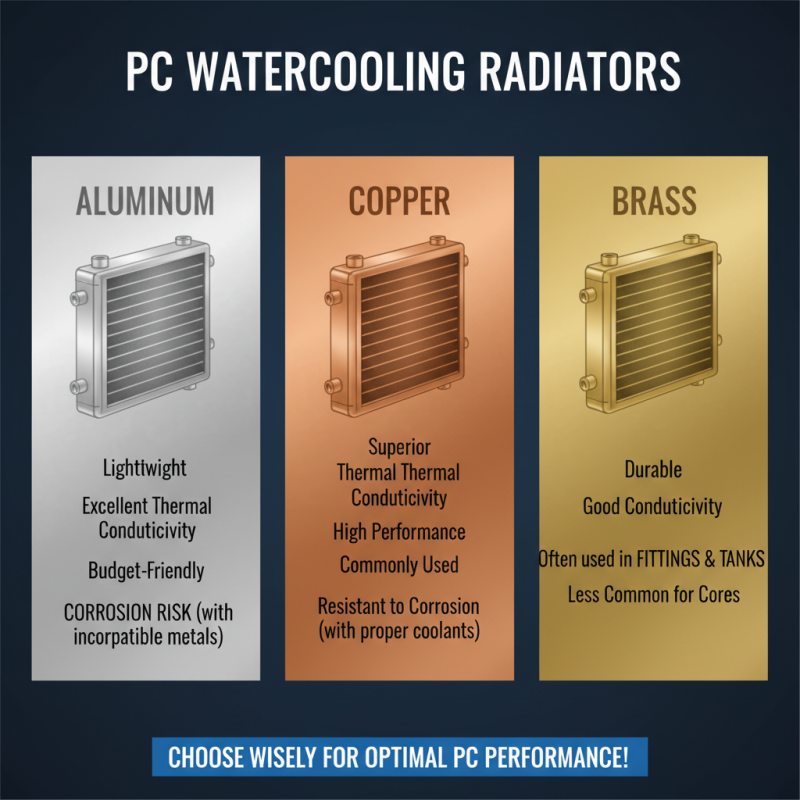
Additionally, the material of the radiator plays a crucial role in performance. Most radiators are made of copper or aluminum; copper offers better thermal conductivity but might be heavier and more expensive, while aluminum is lighter and more cost-effective. The choice between single, double, or even triple-fan configurations can influence cooling efficiency, especially in overclocking scenarios.
Tip: Investing in high-quality fans can significantly enhance airflow and reduce noise levels. Always check for compatibility with your existing cooling setup to ensure optimal performance.
Evaluating Key Specifications for Optimal Cooling Performance
When selecting a watercooling radiator for your PC, evaluating key specifications is crucial for achieving optimal cooling performance. One of the primary factors to consider is radiator size and thickness. Larger radiators typically provide better surface area for heat dissipation, while thicker radiators can accommodate more cooling fans, increasing airflow and enhancing cooling efficiency. It's essential to strike a balance between size and compatibility with your PC case to ensure seamless installation without compromising airflow.
Another critical specification is fan compatibility and speed. Different radiators support various fan sizes and RPM (revolutions per minute) ranges. Higher RPM fans can move more air, leading to more effective heat removal, but they may also produce more noise. Therefore, it's vital to consider your personal tolerance for noise versus the performance benefits. Additionally, evaluating static pressure ratings of the fans in relation to the radiator’s design can significantly influence overall cooling performance, particularly in push-pull configurations where airflow dynamics are key. Selecting the right combination of these factors will ensure that your system remains cool, even during demanding tasks.
Choosing the Right Size and Compatibility for Your PC Case
When selecting a watercooling radiator for your PC, one of the most critical factors to consider is the size of the radiator and its compatibility with your PC case. Before making a purchase, measure the available space within your case, particularly the areas designated for radiators. Most cases will support either 120mm, 140mm, or larger radiators, so it’s essential to know which dimensions your case can accommodate. Additionally, check for any obstructions like drive cages, fan mounts, or GPU placements that may limit the effective installation of a larger radiator.
It's also vital to ensure that the radiator is compatible with your cooling setup. Consider the orientation and airflow direction; proper airflow will greatly enhance the cooling effectiveness. If your case allows for top-mounted radiators, make sure you can fit fans and ensure they can adequately pull air through the radiator. Similarly, if you opt for a front-mounted setup, ensure that there’s enough clearance not only for the radiator but also for any connected components, as this can impact overall cooling performance. By carefully assessing these factors, you can ensure a smooth installation process and optimal performance from your watercooling system.
Exploring Different Types of Watercooling Radiators Available
When it comes to watercooling your PC, understanding the different types of radiators is crucial for achieving optimal performance. The most common types of watercooling radiators are the aluminum, copper, and brass varieties. Aluminum radiators are lightweight and have excellent thermal conductivity, making them a popular choice for many PC builders. They are often more budget-friendly, but it’s important to ensure they are used with a compatible cooling loop to prevent corrosion caused by the aluminum interacting with other metals.
Copper radiators, on the other hand, are renowned for their superior thermal performance and durability. They are heavier than aluminum radiators and tend to be more expensive, but the increased heat dissipation can lead to lower temperatures for high-performance systems. Brass radiators offer a middle ground, combining effective thermal transfer with robustness. It's essential to consider factors like the fan configuration, radiator thickness, and surface area when selecting a radiator, as these attributes will influence overall cooling efficiency and system noise levels. Exploring these options allows you to tailor your PC's cooling solution to your specific needs and preferences.
Comparing Price Points and Brands for Quality Assurance
When selecting a watercooling radiator for your PC, understanding the price points and quality of various options available in the market is essential. Radiators can significantly vary in cost, often dictated by factors such as size, material, and cooling efficiency. A higher price tag typically reflects superior build quality and better thermal performance, which is crucial for maintaining optimal operating temperatures during intensive tasks. Therefore, it's important to balance your budget with the desired cooling capability to ensure that you are making a worthwhile investment for your system.
In addition to price, examining the reputation of different brands can be a guiding factor in your decision-making process. While the market offers numerous options, focusing on established manufacturers known for their reliability and performance can save you from potential headaches down the line. Reading customer reviews and performance benchmarks can provide valuable insights into how different radiators perform under various conditions. By combining this information on price points with a thorough assessment of brand quality, you can choose a watercooling radiator that not only fits within your budget but also meets your performance needs effectively.
2025 Guide: How to Choose the Best Watercooling Radiator for Your PC
| Radiator Type |
Size (mm) |
Cooling Performance (°C Drop) |
Price ($) |
Noise Level (dBA) |
| 120mm |
120 |
5-7 |
45 |
30 |
| 240mm |
240 |
8-10 |
60 |
35 |
| 360mm |
360 |
10-12 |
90 |
38 |
| 480mm |
480 |
12-15 |
110 |
40 |